How to Hide YouTube Recommendations (Homepage, Sidebar, End Screens)
YouTube has no setting that hides recommendations. What the native options really cost, exact uBlock Origin filters, Unhook, and a cross-site fix.
YouTube has no setting that simply hides recommendations. Its native controls either tune them per-video (the not-interested and don't-recommend-channel options) or remove them by turning off watch history — which blanks your entire homepage. To hide recommendations while keeping search, subscriptions, and the videos you came for working, you need an extension: Unhook (free, YouTube-only), uBlock Origin filter lines if you already run it, or BrowseWell if the same pattern follows you to other sites.
Each option below is a legitimate answer for somebody. The point of this page is to tell you honestly what each one costs, so you can pick the one that costs you least.
What YouTube itself offers — and what each option really does
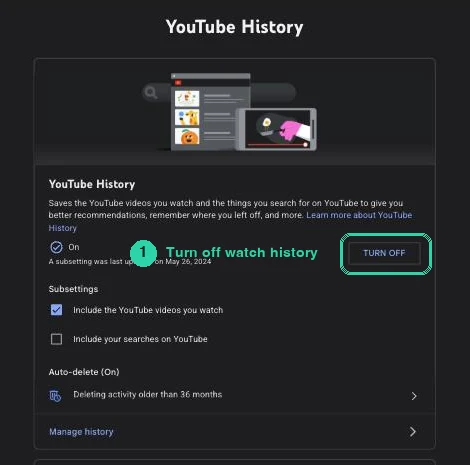
The watch-history control, where it actually lives: myactivity.google.com → Controls → YouTube History.
Per-video tuning: the not-interested and don't-recommend-channel options. Both live behind the three-dots menu on any recommended video. They do what they say: the algorithm shows you less of that video or channel. What they never do is remove the surface itself. The homepage grid, the sidebar, the end screens all remain — refilled with different recommendations. Tuning is worth doing if you like recommendations and want better ones. If your goal is fewer, it's a treadmill.
The watch-history-off route. This is the closest native thing to "no recommendations," and for some readers it's genuinely the right answer. Go to myactivity.google.com/product/youtube → Controls → YouTube History → Turn off. For accounts without significant prior history — and, as enforcement has tightened in waves from 2023 through April 2026, increasingly others — YouTube responds by disabling the home feed entirely. You get a search-bar-only homepage.
That's a tradeoff, not a trick. What you gain: the homepage stops being a slot machine, with zero extensions installed. What it costs: the whole homepage goes blank, not just the noise; features that depend on history (resume watching, useful recommendations when you want them) stop working; and the recommendations sidebar on watch pages remains — history-off empties the home feed, not the watch page. If you mostly arrive at YouTube by search anyway, this route may be all you need. If you rely on the homepage to surface uploads, it will feel like a broken site.
uBlock Origin filter lines (for people already running it)
If uBlock Origin is already in your browser, three filter lines hide the homepage recommendation surfaces. These are verbatim from the maintained "Filters for Social Media Distractions" list (v1.2.2, updated February 2026):
www.youtube.com##ytd-rich-grid-row,#contents.ytd-rich-grid-row:style(display: contents !important)
www.youtube.com##ytd-browse[page-subtype="home"]
www.youtube.com###scroll-container > .yt-chip-cloud-renderer.style-scope
Add them via the uBlock dashboard → My filters → Apply changes. For anything these miss — a stray shelf, the sidebar on watch pages — uBlock's element picker lets you point at an element and hide it, adjusting its two sliders until the preview covers exactly what you want gone (full walkthrough in how to block part of a website). Shorts have their own dedicated filter list, covered in how to hide YouTube Shorts.
The honest limit: selectors break when YouTube renames its page elements, which happens regularly. You're depending on the list's maintainer keeping up — a reasonable bet with a maintained list, but a bet.
Unhook: the purpose-built free answer
Unhook exists to do exactly what this page's title says, without filter syntax. As of July 2026: about 1 million users, 4.9 stars from 4.4K ratings, updated March 2026, no-data-collection declaration, with Firefox and Edge builds too.
Every recommendation surface is a toggle: homepage feed, sidebar/related videos, end-screen videowall and cards, Shorts, comments and live chat, playlists and mixes, trending and explore, the notification bell, even irrelevant search results — plus an option to hide or redirect straight to Subscriptions. Turn off what pulls at you, keep what you use.
Best for: YouTube is your only problem site. If that's you, install Unhook and stop reading — it's free, excellent, and this recommendation stands on its own. (If you landed here because DF Tube died on you, the DF Tube alternatives page maps each of its features to a replacement.)
BrowseWell: the same cleanup, plus the visit itself
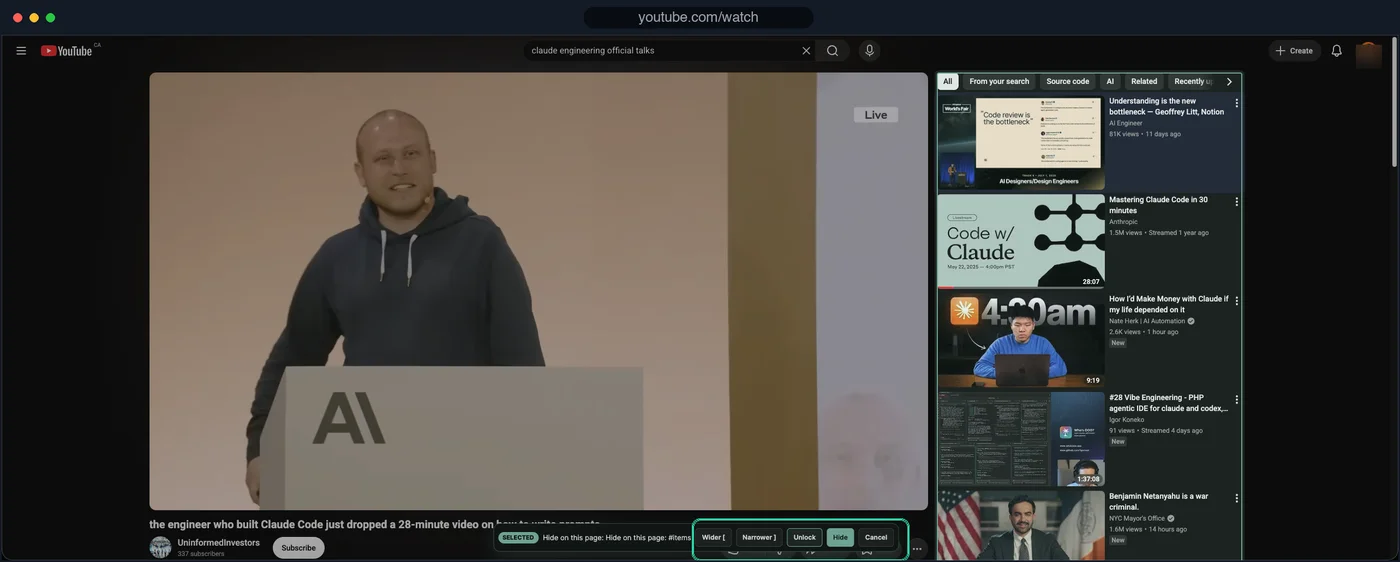
Step 1 — point the picker at the related rail; widen until the whole column is selected.
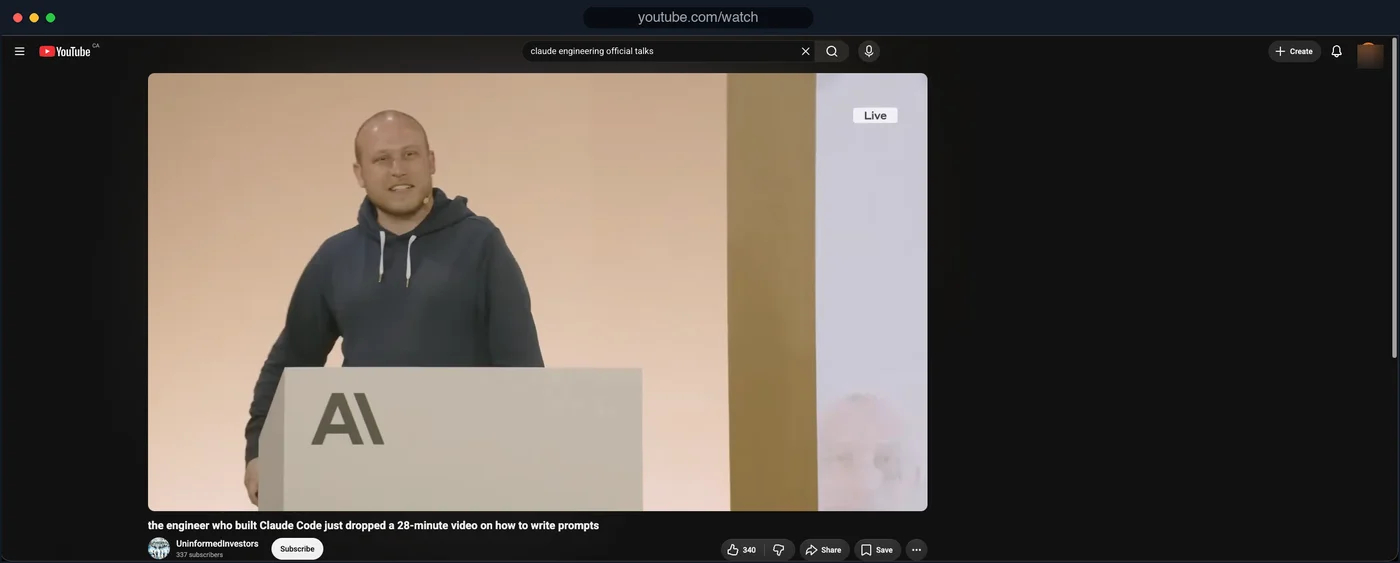
Step 2 — the rail is gone. The video, and nothing pulling sideways.
BrowseWell hides YouTube recommendations, Shorts, and comments the way the tools above do — and then addresses the part none of them touch: the visit. Hiding recommendations fixes what the page looks like; it has no opinion about the reflexive tab-open that started the visit, or the 40 minutes that follow one legitimate video.
- The same treatment everywhere. The feed-and-recommendation pattern isn't a YouTube invention — Reddit, LinkedIn, and X run on it too. One tool covers all of them instead of one extension per site.
- Keep one element visible. For a tutorial session, keep just the video and hide everything around it.
- Intentional Sites. youtube.com itself opens after you state what you're there for — "watch the deployment talk" — for a bounded window, instead of opening on autopilot (the pattern in how to stop mindlessly scrolling).
Tested July 2026 on youtube.com with BrowseWell v2.1.0: the watch-page related-videos rail was selected with the picker and hidden (screenshots above); the video, search, and subscriptions kept working. YouTube renders as a single-page app, so the rule re-applies as you move between videos.
It's local-first (browsing data stays in your browser, no account), with a 30-day full-access trial — no card — then $9/month, $67/year, or $197 lifetime. Honest fit: for YouTube alone, Unhook is free and enough. BrowseWell earns its keep when you notice the same loop on your second and third site. If that's the shape of it, start the 30-day free trial.
Which option fits you
- No extensions, arrive by search, don't need the homepage → turn off watch history and accept the blank home feed.
- Already run uBlock Origin → paste the three filter lines above.
- YouTube is the only problem site → Unhook.
- Same pattern on multiple sites, or the reflex-open is the real issue → BrowseWell.
FAQ
Can I turn off recommendations in YouTube's settings? No. As of July 2026, YouTube offers no setting that hides recommendations. The native controls tune what's recommended (not-interested and don't-recommend-channel) or, via turning off watch history, blank the home feed entirely — there is no middle switch.
Does marking a video not-interested remove the recommendations grid? No. It removes that video and adjusts future suggestions. The grid, sidebar, and end screens remain and refill.
Will recommendations stay hidden after YouTube updates its site? Extension-dependent. Maintained tools (Unhook, an actively updated filter list, BrowseWell) ship fixes when YouTube renames page elements; hand-written filters and unmaintained extensions quietly stop matching. No tool can promise immunity to future redesigns — anyone who says otherwise is guessing.