How to Block Part of a Website (Instead of the Whole Site)
Block one page, path, or element of a site — not the whole domain. Exact steps for URL habits, uBlock Origin's element picker, and granular guards.
To block part of a website instead of the whole site, you have three main options: block specific URL paths (for example, reddit.com/r/popular but not the rest of Reddit) using a blocker that supports path-level rules; hide specific page elements (a feed, a recommendation sidebar, a Shorts shelf) using a cosmetic filter tool like uBlock Origin's element picker; or use a granular focus extension that combines path guards and element hiding with time-bounded access (Method 3 below). Browsers themselves have no built-in partial-blocking feature, so all three approaches rely on an extension or on changing which URLs you visit.
That's the short answer. The rest of this page is the exact steps for each approach, a comparison table, and the questions people usually ask next.
Why partial blocking beats whole-site blocking
Most useful sites have a working part and a trap part sharing one domain. YouTube has your tutorial and the Shorts feed. Reddit has the thread that solves your bug and r/all. LinkedIn has the message you need to answer and the feed above it.
Block the whole domain and you'll eventually need the working part, disable the blocker, and drift. Block only the trap part and there's nothing to disable. This single design difference is why partial blocking tends to survive longer than domain blocking.
Method 1: Change the URLs, not the site (no extension)
Chrome has no native way to block a path or hide an element, but you can restructure how you enter sites so the trap parts stop being your front door:
- Bookmark the working page, not the home page.
youtube.com/feed/subscriptionsinstead ofyoutube.com.reddit.com/r/yoursubredditinstead ofreddit.com. Old-interface variants likeold.reddit.comalso skip most engagement surfaces. - Replace your muscle-memory entry points. Delete the home-page bookmarks from your bookmarks bar and put the deep links in their place, in the same positions.
- Turn off the site's re-entry hooks. Click the padlock/tune icon left of Chrome's address bar → Site settings → set Notifications to Block, so the site can't invite you back.
This costs nothing and takes five minutes. Its limit: nothing enforces it. The home page is still one keystroke away when the reflex hits.
Method 2: uBlock Origin's element picker (free, per-element)
uBlock Origin — a free, open-source content blocker — can hide any element on any page:
- Open the page with the element you want gone (say, YouTube's home page with its Shorts shelf).
- Click the uBlock Origin toolbar icon, then the eyedropper ("Enter element picker mode").
- Hover until the element you want is highlighted, and click it.
- In the dialog that appears, adjust the two sliders — one widens or narrows how much of the page the filter covers, the other its specificity — until the preview covers only the element you want gone.
- Click Create. The rule is saved and applies on every future visit.
uBlock can also block entire paths rather than elements. In the dashboard's My filters tab, a line like:
||youtube.com/shorts/$document
stops any /shorts/ URL from loading at all, while the rest of YouTube works. (Worked example with a full filter set: how to hide YouTube Shorts.)
Limits: picker rules can break when sites rename their page elements, un-hiding everything is one click on the toolbar's power button, and uBlock has no concept of time, sessions, or intent — it edits pages, not visits.
Method 3: A granular guard (BrowseWell)
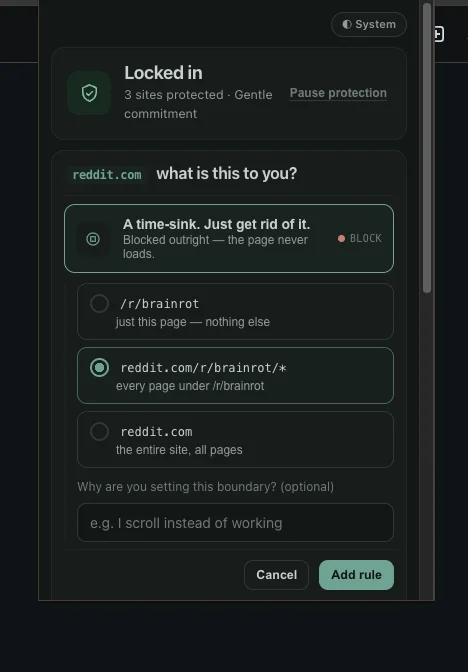
The setup is the whole idea: pick exactly how much of the site to guard — one page, one path, or all of it.
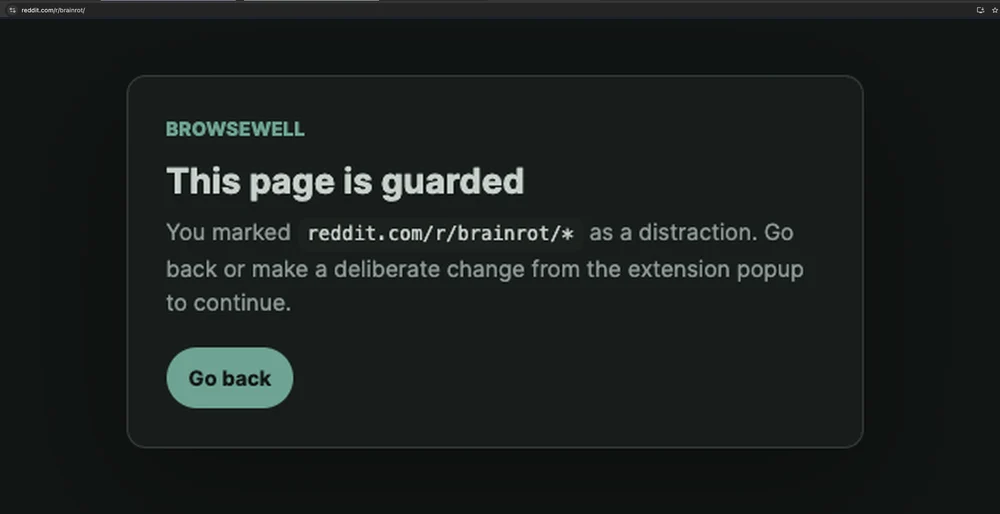
The result — this path is covered; every other subreddit loads normally.
BrowseWell is a Chrome extension built specifically around partial blocking:
- Guard a path or page. Add
reddit.com/r/popular(or any domain, page, or path section) as a guarded rule. Visits to that path meet a guard; the rest of Reddit stays open. - Hide elements without writing filters. Its distraction filters hide feeds, recommendations, Shorts, and comments on the sites where the traps are, or hide everything except one element you choose to keep.
- Bound the visit. Habitual sites can be set as Intentional Sites: they open after you state what you're there to do, for a limited window. Optional Hard Mode adds a wait and a typed reflection before a rule can be switched off, so the one-click escape from Method 2 stops being one click.
It's local-first — browsing data stays in your browser, no account — with a 30-day full-access trial (no card), then $9/month, $67/year, or $197 lifetime; basic blocking you've set up stays in place after the trial either way. Details at browsewell.app.
Tested July 2026 on reddit.com and youtube.com with BrowseWell v2.1.0: a path-level guard covered one section (a single subreddit) while the rest of the domain stayed reachable, and the element picker hid a chosen element (a feed or shelf) without breaking the page. Path guards survive redesigns; cosmetic element rules may need re-selecting when a site changes its markup.
Comparing the three approaches
| URL habits (no extension) | uBlock Origin | BrowseWell | |
|---|---|---|---|
| Cost | Free | Free | $9/mo, $67/yr, $197 lifetime; 30-day trial |
Blocks a path (e.g. /r/popular) |
No — avoidance only | Yes, $document filters |
Yes, guard rules |
| Hides page elements | No | Yes, element picker | Yes, distraction filters + keep-one-element |
| Survives site redesigns | Yes | Sometimes — filters can break | Maintained filters |
| Time-bounded access | No | No | Yes — intent gates, windows, sessions |
| Effort to switch off | n/a | One click | Deliberate, with optional Hard Mode friction |
| Best for | Low-effort start | Precise, free cleanup | Working sites you open on autopilot |
The honest recommendation: do Method 1 today regardless. Add uBlock if specific elements keep pulling at you. Add BrowseWell if the visits themselves — not just the page contents — are where your time goes.
FAQ
Can I block part of a website in Chrome without any extension? Not directly — Chrome has no built-in setting to block a URL path or hide a page element. Without extensions you're limited to changing your entry points (deep-link bookmarks, notification blocking) as in Method 1 above.
Can uBlock Origin block a specific page or subreddit instead of the whole site?
Yes. A static filter with the $document option, such as ||reddit.com/r/popular$document, blocks that path from loading while the rest of the domain stays reachable. The element picker separately hides individual page elements anywhere.
How do I block YouTube Shorts but keep the rest of YouTube?
Either hide the Shorts surfaces (uBlock filters or BrowseWell's distraction filters) or block the /shorts/ path itself while leaving youtube.com open. Step-by-step instructions, including exact filter lines: how to hide YouTube Shorts.
Will hiding elements break the website? Occasionally. Cosmetic rules that are too broad can hide containers the site needs, and redesigns can shift what a saved rule matches. If a page misbehaves, disable the newest rule first. Path-level guards don't have this problem — the page either loads or it doesn't.
Is partial blocking better than blocking the whole site? It depends on whether you need the site. If you never need it, a whole-site block is simpler — see BrowseWell vs Cold Turkey for that trade-off. If the site is part of your work, partial blocking removes the trap without creating the disable-the-blocker moments that make whole-site blocks fall apart.