Use the internet on purpose.
Keep the sites you need. Lose the feeds that hijack them. BrowseWell guards the reflex to check — a beat of friction right where it fires — so you focus without blocking the whole internet.
30-day free trial · No account required · No data leaves your browser
The internet isn't broken. Your attention is being sold.
Most blockers force an all-or-nothing choice. BrowseWell fixes the real problem: the design patterns built to hijack your focus.
You need the site, not the feed
Email, docs, and reference sites are useful — but their feeds, recommendations, and sidebars pull you off task. BrowseWell lets you keep the tool and hide the trap.
Blocking everything doesn't last
Total site bans create emergencies: a client link, a password reset, a shared doc. Then you disable the blocker and forget to turn it back on.
Willpower is not a system
Every time you resist a distraction, you spend cognitive fuel. BrowseWell removes the decision by adding just enough friction at the right moment.
Six tools. One reflex to protect.
Each one guards a different attention trap — without making the internet unusable.
Block distractions
Guard an entire domain, an exact URL, or a path section like reddit.com/r/all/*. One-click buttons block the current page or its parent section.
Gates (ask-first sites)
Mark a must-use site as a Gate. Each visit asks what you're doing and gives you a few minutes. When time is up, the page dims and prompts you to close it.
Hide attention traps
Remove feeds, sidebars, recommendations, notification badges, or any element. Use the picker to build a selector, then apply it across a site or a single page.
Focus blocks — with a goal, on your schedule
Start a 25, 50, or 90-minute block with a goal — or set recurring blocks that start on their own, so you never have to remember. Drift to a distracting site and BrowseWell asks whether it serves that goal; keep getting pulled to the same one and a single tap makes it gone for the rest of the block. The usual distractions are covered out of the box — no list to build.
Hard to defeat on purpose
Pick your commitment level. Pausing protection takes a short wait — or a typed reflection when you've chosen Locked. The friction scales with the blast radius — and with how many exits you've already taken today — so casual bypasses don't become habits.
Local-first privacy
Your rules, timers, and stats live in Chrome's storage on your device. No account. No analytics. No tracking. The only thing ever sent off-device is a license key you choose to enter.
A reflex check, interrupted
One protected site, six quiet moments — the loop BrowseWell puts in place of willpower.
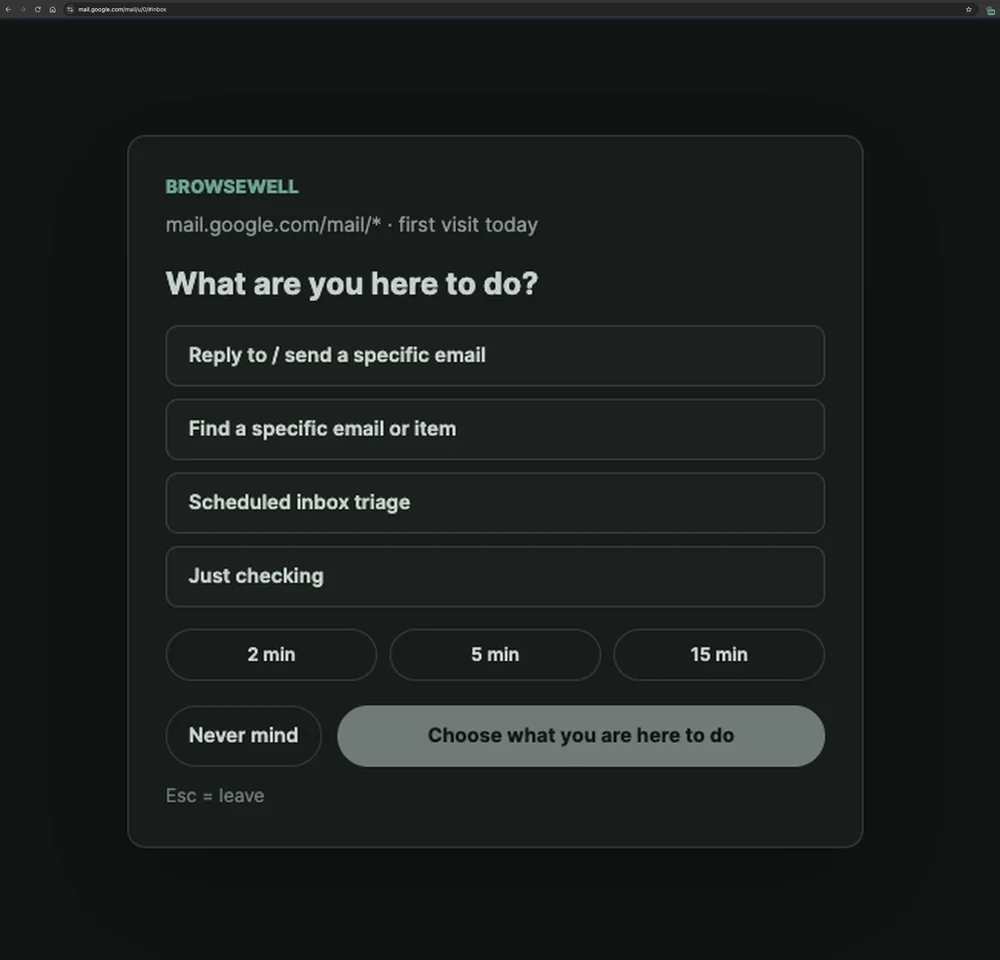
The inbox stays covered until you say why you're here and take a time box. Real site, real URL.
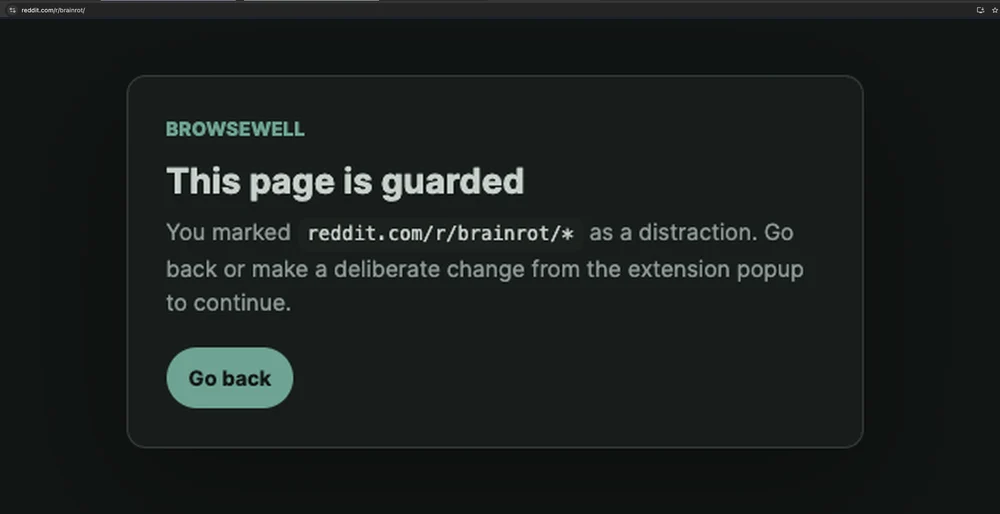
One subreddit guarded, the rest of Reddit untouched. Block the part that eats you, keep the part you use.
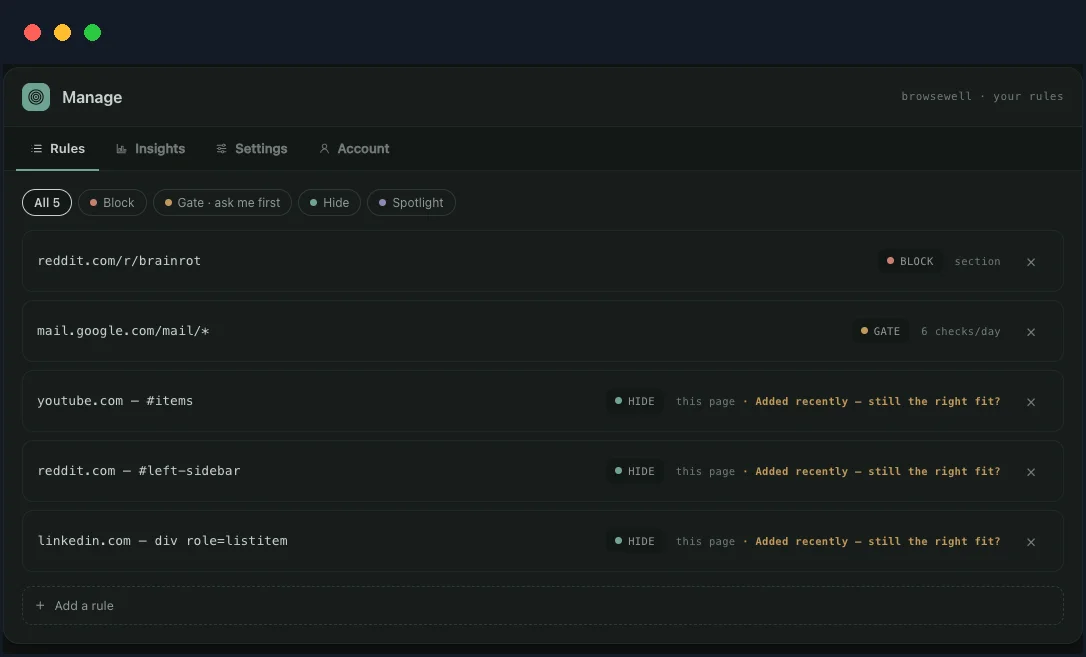
Block a path. Gate a habit with a daily budget. Hide the elements that pull you in. Each site gets exactly the rule it needs.
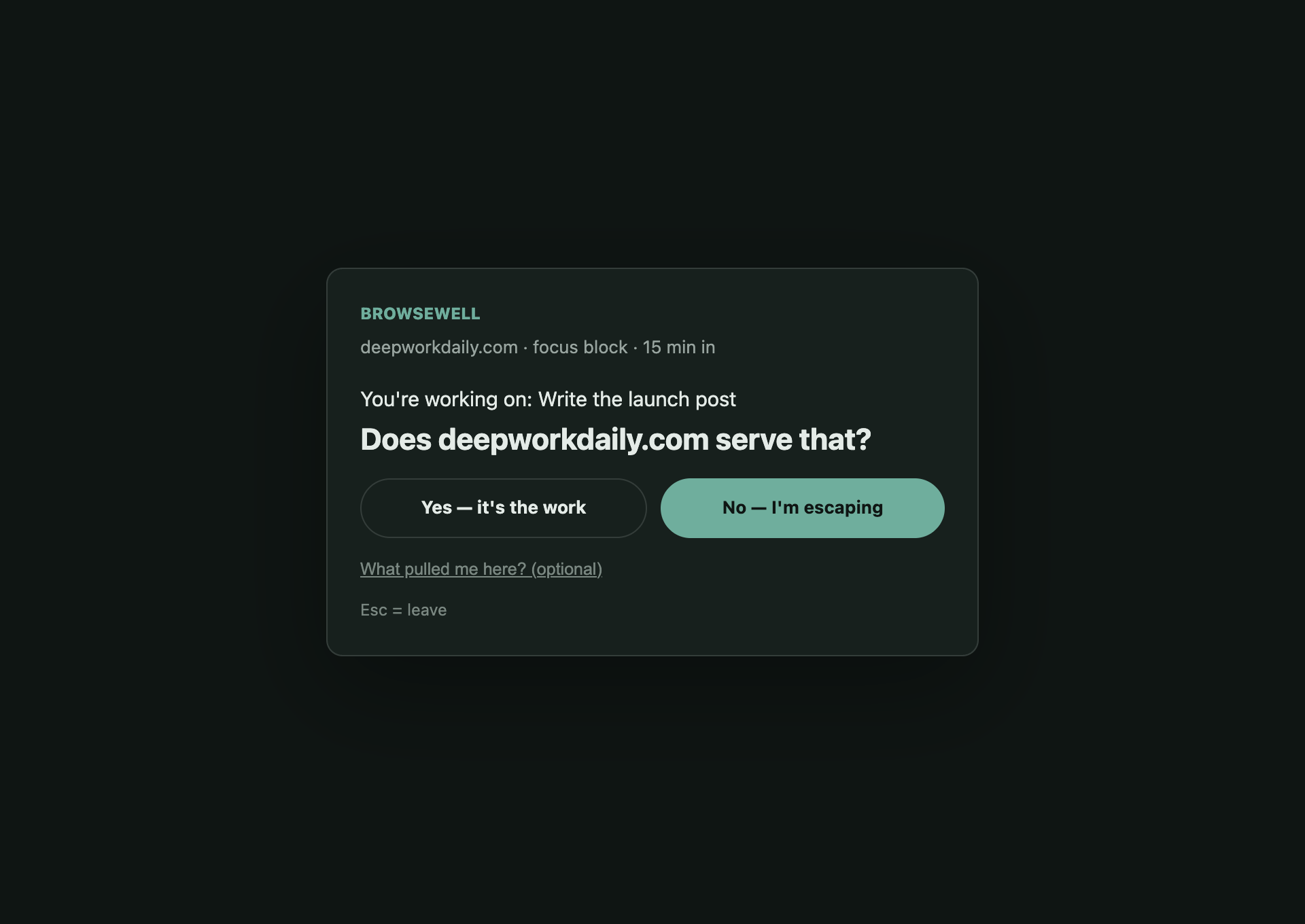
Mid-focus-block, a wander to a protected site gets one question: does this serve your goal?
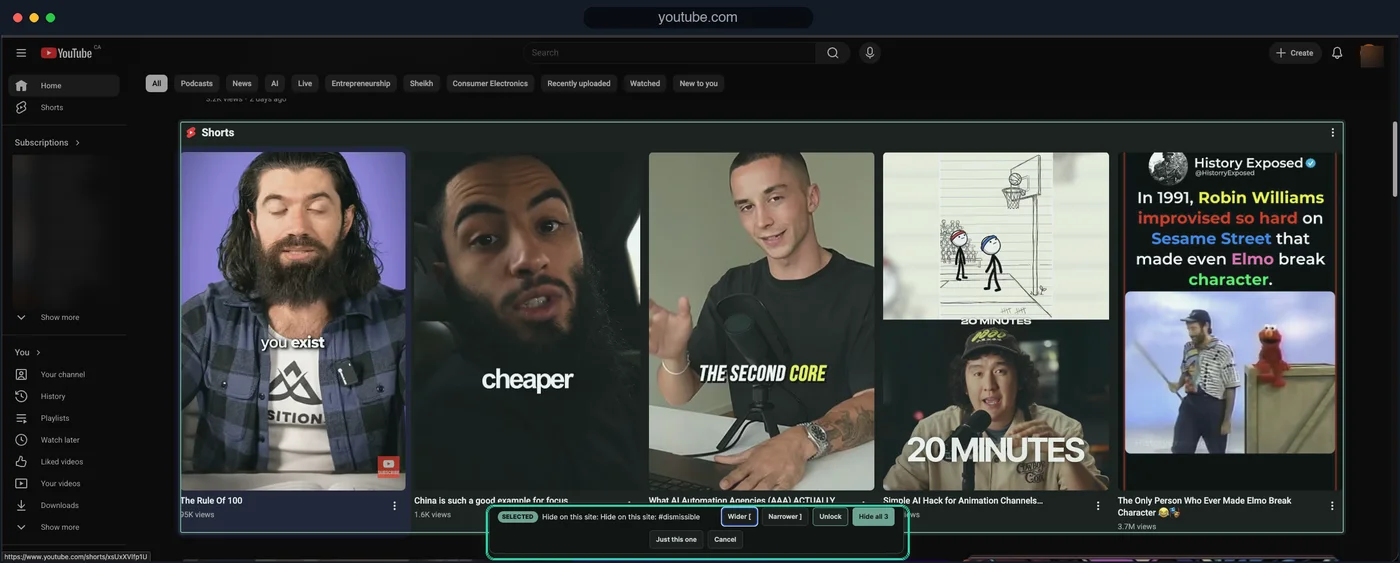
The picker on YouTube's actual Shorts shelf — one click hides it across the whole site.
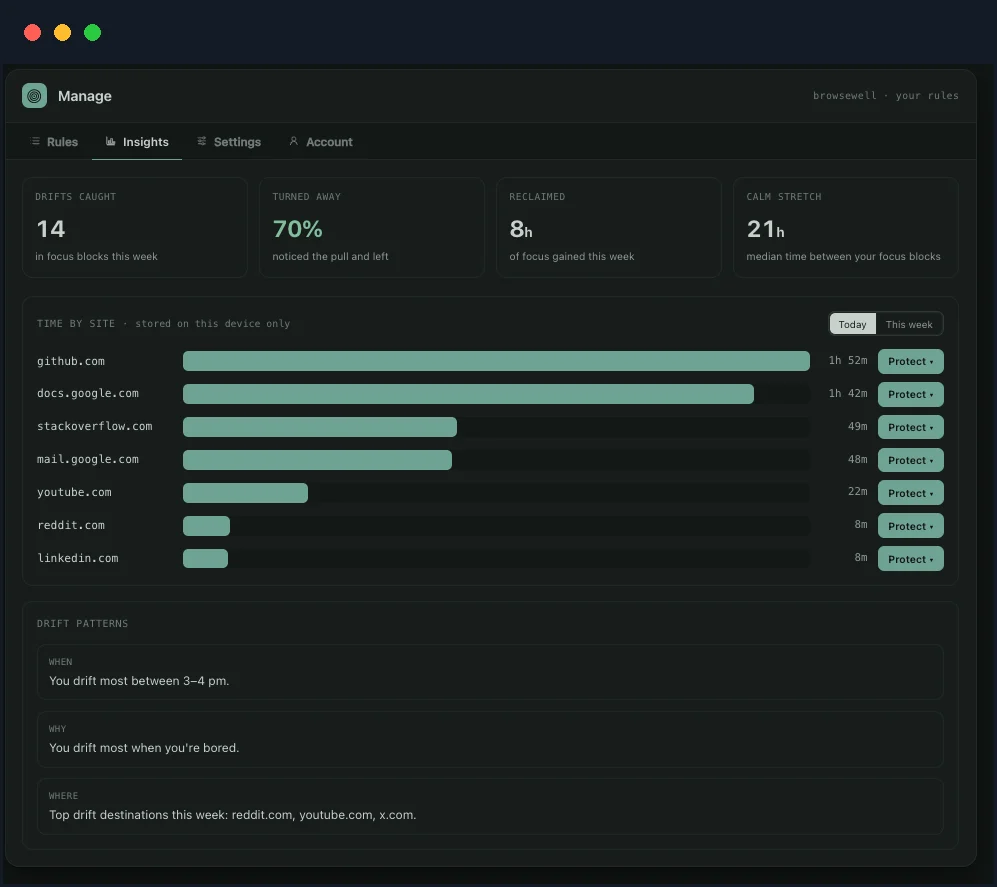
See where the time actually goes. The label says it: stored on this device only.
Set it up in under a minute
No onboarding course, no account setup, no import of blocklists from 2014.
Install the extension
Add BrowseWell from the Chrome Web Store. It takes a single click and requests only the permissions it needs.
Add your first guard
Open the popup on a site that pulls at you and answer one question — what is this site to you? A time-sink gets blocked; a must-use site gets an intent gate.
Work without the pull
BrowseWell steps in before reflex takes over, so you stay on task and close tabs on your own terms.
Simple pricing
Start free for 30 days. No credit card required. If BrowseWell saves you one distracted hour a month, it pays for itself.
- Full access to all features
- Unlimited guards and filters
- Up to 5 devices
- Cancel anytime
- Full access to all features
- Unlimited guards and filters
- Up to 5 devices
- 38% cheaper than monthly
- Cancel anytime
- All future updates included
- Up to 5 devices
- One payment, forever
- No subscription to manage
30-day money-back guarantee. When the trial ends, everything you set up keeps protecting you and plain site blocks stay free — only new Intentional Site gates and distraction filters need a license. How licensing works.
Why people trust BrowseWell
No dark patterns, no data harvesting, no growth hacks. Just a tool that does what it says.
Install and use. We don't ask for your email, phone number, or OAuth login.
Your rules, history, and stats never leave your device. We can't sell what we don't have.
Not satisfied? Email us for a full refund, no questions asked.
BrowseWell is funded by people who pay for it, not by ads or investor growth targets.
Questions & answers
Do I need a credit card to start the trial?
No. Install the extension and use all features free for 30 days. You only pay if you decide to keep premium features after that.
What happens when the trial ends?
Everything you already set up keeps protecting you — blocks, gates, and filters all keep enforcing, licensed or not. There is also a 48-hour grace period once the trial ends. After that you can still add plain site blocks for free; only new Intentional Site gates and new distraction filters wait for a license.
How do I get my license key, and where does it go?
Your key appears on the confirmation page right after checkout — copy it there. To activate it: click the BrowseWell icon, then Manage rules & insights, open the Account tab, paste the key under "Restore with a license key", and click Restore. Keys look like BW-XXXX-XXXX-XXXX. If you lose it, email support with your Stripe receipt and we'll send it back.
How many devices does one license cover?
Up to 5, on every plan including lifetime — enough for a laptop, a desktop, and a work machine with room spare. One license is for one person; it isn't meant to be shared. If you need to move your license to a new machine, email support and we'll sort it out.
Does BrowseWell need to be online to check my license?
Only briefly. Your key is re-checked roughly once a day and the result is cached on your device, so paid features keep working offline. If the check can't reach us, BrowseWell keeps your last known state rather than pausing anything.
Can I cancel my subscription?
Yes. You can cancel anytime from your billing account. Your license stays active until the end of the paid period. If a payment fails, your license also stays active through the period you already paid for.
Is my data safe?
Yes. BrowseWell stores everything in Chrome's local storage on your device. The only thing ever sent to our server is a license key for validation.
Does BrowseWell work on mobile Chrome?
Chrome extensions are desktop-only, so BrowseWell works on Chrome for Windows, macOS, Linux, and ChromeOS.
Focus without fighting yourself.
Join the people who do focused work without uninstalling the internet — no willpower required.
Add to Chrome — it's free30-day free trial · No credit card required