BrowseWell vs Cold Turkey: Hard Blocks or Smart Friction?
Cold Turkey is a US$39 one-time hard blocker for Windows and Mac. BrowseWell guards parts of sites with intent gates. Which fits how you get distracted?
Cold Turkey Blocker's whole identity is strength. It calls itself "the toughest website and app blocker on the internet," and by most accounts it earns the title: once a Cold Turkey block is running with its locking features on, ending it early is genuinely hard.
BrowseWell is built on a different premise: for a lot of people — especially those who need distracting sites for legitimate work — maximum toughness is what makes blockers fail. You hit a real need, disable the tool, and never quite set it up again.
Neither premise is wrong. They fit different ways focus tools break down. Here's the honest comparison, with Cold Turkey's details verified from getcoldturkey.com as of July 2026.
What Cold Turkey does
Cold Turkey is a desktop application for Windows and macOS. It states plainly that Linux, ChromeOS, Android, and iOS are not supported.
Because it runs at the system level rather than as a browser extension, its blocks apply across every browser and — in the Pro version — to desktop applications and games too. That's the structural difference from any extension-based tool: you can't dodge it by opening a different browser.
As of July 2026:
- Price: Pro is a one-time purchase of US$39, shown in your local currency at checkout — no subscription, with free lifetime updates and installation on all computers you personally use. There's a 30-day money-back guarantee.
- Free version: website blocking with timed blocks, website exceptions, and statistics, plus a 7-day trial of Pro features.
- Pro adds: application blocking, scheduled blocks, breaks and allowances, and the full set of locking options — including blocking your entire computer.
The locking features are the point. You can make a block that survives a restart, resists being ended early, and doesn't negotiate. If you want tomorrow-morning-you to have no say in the matter, Cold Turkey delivers that better than almost anything else.
What BrowseWell does
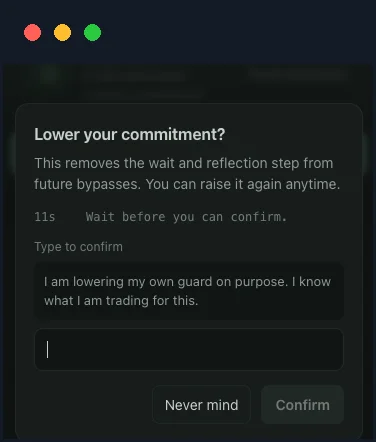
Weakening protection takes a wait and a typed reflection — possible, never accidental.
BrowseWell is a Chrome extension and attention management system. Its approach isn't to make sites unreachable — it's to make unintentional visits harder while keeping the useful internet open:
- Granular guarding: guard a whole domain, one specific page, or a path section —
reddit.com/r/popularguarded, the subreddit you use for work untouched. - Distraction filters: hide YouTube recommendations and Shorts, the LinkedIn feed, comment sections, and other attention traps inside sites you keep using. You can also keep one chosen element visible and hide the rest of the page.
- Intentional Sites: habitual sites open only after you state why you're there, for a bounded window.
- Focus sessions tied to a stated goal.
- Hard Mode: optional friction — a wait, a typed reflection — so bypassing a rule is deliberate rather than reflexive.
It's local-first (browsing data stays in your browser, no account), with a 30-day full-access trial — no card, no account — then $9/month, $67/year, or $197 lifetime. After the trial, basic blocking you've already set up stays in place whether or not you pay.
The real difference: what happens when work needs the blocked thing
With Cold Turkey, a block is a wall. If your workflow never needs the wall opened — you're studying for an exam, writing a thesis, cutting out games — that rigidity is exactly the feature you're buying.
But if you need part of a blocked site mid-block, your options narrow fast: pre-configured exceptions, waiting it out, or working around the very lock you chose. People whose work lives on YouTube, Reddit, or X tend to respond by making their blocks looser and looser until the tool isn't doing much. The strictest blocker only works if you never have a legitimate reason to get past it.
BrowseWell inverts this. The site opens — after an intent prompt, with the feed hidden, inside a time-bounded window. The reflexive check gets interrupted; the real task goes through. Nothing is impossible to bypass, but nothing is bypassed on autopilot either.
A second structural difference: Cold Turkey covers your whole computer, including apps. BrowseWell lives in Chrome and can therefore do things a system blocker can't — hide individual page elements, gate a path but not a domain — but it doesn't cover other browsers or desktop apps. (For the element-level pattern, see how to block part of a website.)
Side by side
| Cold Turkey | BrowseWell | |
|---|---|---|
| Price | $39 one-time (Pro); free version available | $9/mo, $67/yr, or $197 lifetime |
| Trial | Free version + 7-day Pro trial | 30 days full access, no card, no account |
| Platforms | Windows, macOS (desktop app) | Chrome |
| Scope | All browsers + desktop apps | Inside the browser |
| Blocking style | Hard blocks, schedules, deep locking | Path-level guards, element hiding, intent gates, optional Hard Mode |
| Partial-site control | Website exceptions | Guard paths/pages, hide specific elements, keep one element visible |
| Guarantee | 30-day money-back | 30-day full trial before paying |
Cold Turkey details from getcoldturkey.com as of July 2026.
On price, Cold Turkey is hard to argue with: US$39 once, updates included. If a system-wide hard blocker matches your problem, it's one of the best value purchases in this category, and this page won't pretend otherwise.
Choose Cold Turkey if…
- You want blocks that hold under pressure. Its locking features are the deepest in the category — blocks that survive restarts and resist early exits, up to blocking the whole computer.
- Your distractions include desktop apps and games, not just websites. Extensions can't touch those; Cold Turkey Pro can.
- You use multiple browsers, or you'd realistically just open Firefox to get around a Chrome extension.
- You're on Windows and want depth. System-level blocking on Windows is Cold Turkey's home turf.
- You want to pay once. $39 one-time with lifetime updates.
Choose BrowseWell if…
- Your blocked sites and your work sites are the same sites. You need YouTube, Reddit, X, or Gmail during the day, and hard blocks keep colliding with real tasks until you stop using them — the pattern behind why the best site blocker for ADHD brains isn't the strictest one.
- The problem is inside the page. Cold Turkey decides whether a URL loads. BrowseWell can load YouTube without Shorts and recommendations, or LinkedIn without the feed.
- Autopilot is the problem, not access. An intent gate catches the reflex-open in the moment; a schedule can't, because reflex-checks happen at all hours.
- You want friction you'll still respect in month three. Rules you can renegotiate deliberately tend to survive longer than walls you eventually tear down.
If your pattern is "I don't need these sites at all — make them go away," buy Cold Turkey. If your pattern is "I need these sites, but they keep swallowing me," BrowseWell has a 30-day full-access trial — no card, no account. And if cross-device scheduled blocking is what you're actually after, read BrowseWell vs Freedom instead.