BrowseWell vs Freedom: Two Different Answers to Distraction
Freedom blocks whole sites on a schedule across devices. BrowseWell guards parts of sites in your browser. An honest comparison to help you pick.
Freedom and BrowseWell are both built to interrupt the drift into distracting sites, but they start from opposite assumptions.
Freedom assumes the site is the problem: block Reddit everywhere, on every device, during your work hours. BrowseWell assumes the unintentional visit is the problem: you legitimately need YouTube for a tutorial, Reddit for a bug thread, LinkedIn to reply to a message — and the trap is what happens after you arrive.
Both assumptions are right for different people. Here is how the tools actually differ, with pricing and features verified from each product's site as of July 2026.
What Freedom does
Freedom is a cross-platform blocker that runs on macOS, Windows, iOS, Android, and Chromebook. You build blocklists of websites and apps, then run sessions that block them — on one device or all of your devices at once.
Its premium feature list (as of July 2026) centers on:
- Scheduled sessions that start automatically, including recurring schedules across the week
- Locked Mode, which prevents ending a session early
- App blocking and full internet blocking, not just websites
- Sync across unlimited devices
- Focus sounds and ambience
Freedom's pricing, from its upgrade page as of July 2026:
- Free plan with basic blocking
- Premium at $8.99/month, or $3.33/month billed yearly (about $40/year)
- A "Forever" lifetime plan listed at $99.50, marked down from $199
The core promise: when a Freedom session is running, the sites on your blocklist are unavailable everywhere. Your phone can't become the escape hatch your laptop just closed.
What BrowseWell does
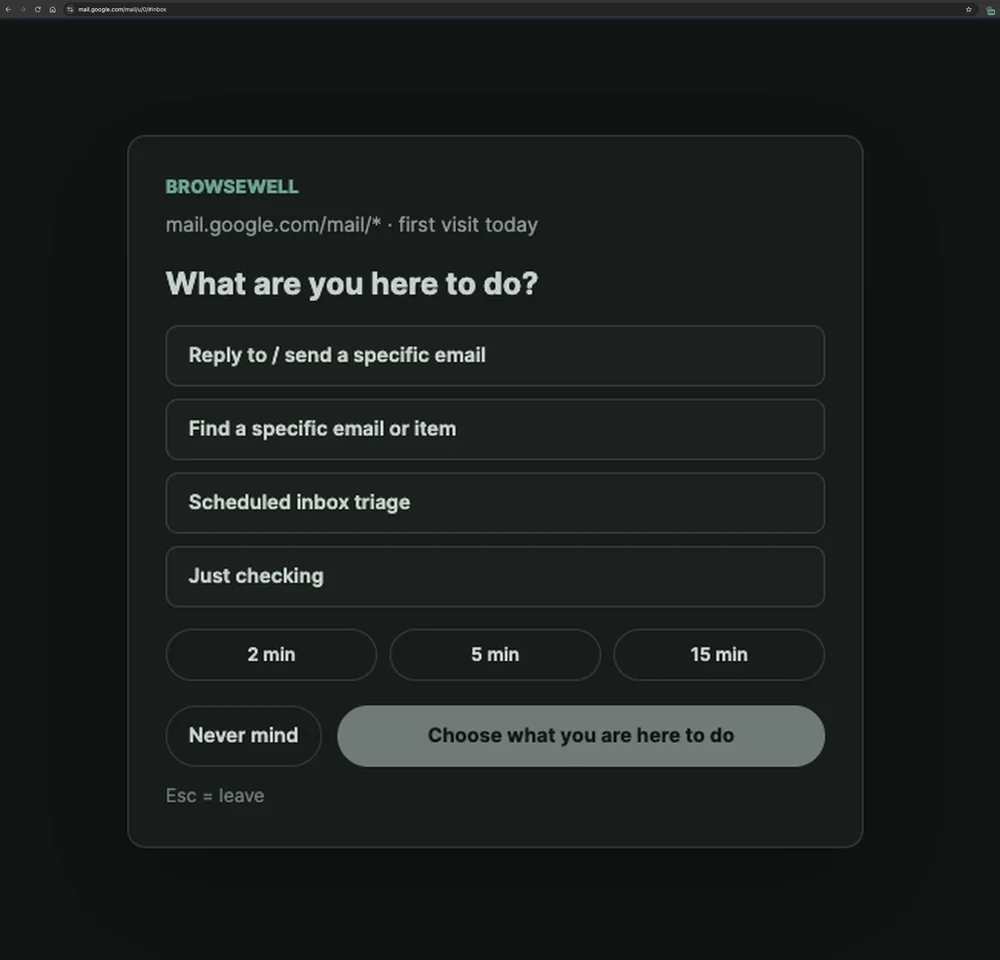
The intent gate on Gmail — the inbox stays covered until you say why you're there and pick a time window.
BrowseWell is a Chrome extension and attention management system. Instead of making sites unavailable, it changes what happens when you open them:
- Guard at any granularity — a whole domain, a specific page, or a path section. You can guard
reddit.com/r/popularwhile leaving the subreddit where you actually get answers untouched. - Hide the parts of a site that pull at you — YouTube recommendations and Shorts, the LinkedIn feed, comment sections — while the useful parts keep working. You can also keep one selected element visible and hide everything around it.
- Intentional Sites — habitual sites like Gmail or X open only after you state what you're there to do, for a bounded window.
- Focus sessions tied to a stated goal.
- Hard Mode — optional friction (a delay, a typed reflection) so bypassing a rule is a deliberate act instead of one reflexive click.
BrowseWell is local-first: your browsing data stays in your browser, and there's no account. Pricing is $9/month, $67/year, or a $197 lifetime license, after a 30-day full-access trial with no card and no account.
The real difference: walls vs. gates
Freedom builds walls on a schedule. During a session, blocked means blocked — and in Locked Mode, deliberately so. That works well when your distracting sites and your work sites are cleanly separate.
It works less well when they're the same sites. If you block YouTube from 9 to 5 and a course you're taking lives on YouTube, you end the session or wait it out. Do that a few times and the schedule starts eroding.
BrowseWell doesn't build walls; it builds gates. The site opens — after you say why, for a window you chose, with the feed hidden. The reflexive check gets interrupted; the legitimate task goes through. Bypassing is possible, but never accidental.
Neither approach is strictly stronger. They target different moments: Freedom targets the hours when distraction is available; BrowseWell targets the seconds when a visit turns from purposeful to automatic.
The same afternoon, with each tool
Say you're a developer, it's 2 pm, and your task needs a YouTube conference talk, a Reddit thread about a library bug, and no email until 4.
With Freedom: if YouTube and Reddit are on your work-hours blocklist, both research tabs hit the block page. You either planned an exception list in advance, or you end the session (prevented in Locked Mode, deliberate otherwise) and lose the block for email too. If they're not on the blocklist, nothing stands between the conference talk and the recommendations sidebar.
With BrowseWell: the talk plays with recommendations and Shorts hidden. Reddit opens after a one-line intent ("find the thread about the memory leak") for a bounded window, so the thread doesn't become r/popular. Gmail is gated until you choose to state a reason.
Where Freedom wins the same afternoon: at 6 pm, your laptop closes and your phone comes out. BrowseWell's day is over — it lives in Chrome. Freedom's session keeps covering Instagram and news apps on the phone. If your evenings are the bigger leak, that's the deciding fact, and no browser extension changes it.
Pricing side by side
| Freedom | BrowseWell | |
|---|---|---|
| Monthly | $8.99 | $9 |
| Yearly | ~$40 ($3.33/mo billed yearly) | $67 |
| Lifetime | $99.50 (listed price, marked down from $199) | $197 |
| Trial | Free plan with basic blocking | 30 days, full access, no card, no account |
| Platforms | macOS, Windows, iOS, Android, Chromebook | Chrome |
Freedom prices from freedom.to as of July 2026.
Freedom's yearly plan is cheaper. If price per device matters most and whole-site blocking fits how you work, that math favors Freedom. BrowseWell's price buys a different thing: partial-site control and intent friction inside the browser where knowledge work actually happens — and after the trial, basic blocking you've set up stays in place even if you don't pay.
Choose Freedom if…
- You need blocking across devices. This is Freedom's genuine strength. If your pattern is "blocked on laptop, picked up the phone," no browser extension solves that. Freedom's synced, scheduled sessions do.
- Your distractions are separable from your work. If you never need TikTok, news sites, or games for work, scheduled hard blocks are simple and effective.
- You want app blocking, not just website blocking. Freedom blocks desktop and mobile apps too.
- You want a schedule you don't renegotiate daily. Recurring sessions plus Locked Mode remove the decision entirely.
Choose BrowseWell if…
- Your distracting sites are also your working sites. You need YouTube, Reddit, X, LinkedIn, or Gmail for real tasks, and all-or-nothing blocking keeps forcing you to turn the blocker off.
- The trap is inside the page, not the URL. Recommendations, Shorts, feeds, comments — BrowseWell hides those surfaces while the rest of the site works. (More on this pattern in how to block part of a website.)
- You open sites on autopilot (the pattern covered in how to stop mindlessly scrolling). An intent gate interrupts the reflex-check in a way a schedule can't, because reflex-checks don't respect office hours.
- Privacy is a requirement. BrowseWell keeps browsing data in your browser, with no account at all.
Some people run both: Freedom for phone apps and evenings, BrowseWell for the workday browser. They don't overlap much, because they weren't built for the same problem.
If the second list sounds like your situation, BrowseWell has a 30-day full-access trial — no card, no account. Start with one guarded site and see whether gates fit you better than walls. If you're also weighing a one-time-purchase hard blocker, see BrowseWell vs Cold Turkey.