How to Hide the LinkedIn Feed (and Get On With Your Networking)
LinkedIn has no setting that hides the feed. What its controls really do, plus News Feed Eradicator, exact uBlock filters, and a gate option.
LinkedIn has no setting that hides the feed — its native controls only let you unfollow, mute, sort, and hide individual posts — so removing it entirely takes a browser extension. The working options: News Feed Eradicator (free, replaces the feed with a quote), a single-purpose feed hider, uBlock Origin filter lines if you already run it, or BrowseWell (hides the feed and the news rail, keeps messages, jobs, and posting working, and can gate linkedin.com behind a stated intent).
If you're here, you probably have to use LinkedIn — messages, recruiting, posting, a job search — and the feed ambushes you on the way to every one of those tasks. Here's each way out, honestly costed.
What LinkedIn's own settings offer (and the plain limit)
Verified against LinkedIn's Help pages as of July 2026, the native controls are:
- Unfollow or mute people and companies (stay connected, stop seeing their posts)
- "I don't want to see this" on individual posts
- Sort the feed by Most Relevant or Most Recent
- Feed preferences, including a political-content toggle and a preferred-feed-view setting
The limit, stated plainly: none of these hides the feed — they filter what's in it. You can spend an hour unfollowing half your network and the feed will still be there tomorrow, refilled. That's not a criticism of the controls; curation is what they're for. But if your goal is "open LinkedIn, do the task, never see the feed," LinkedIn does not sell that switch, and no amount of settings-digging finds it.
News Feed Eradicator: zero-config feed removal
News Feed Eradicator is the established free answer in this category: it removes the feed and puts an inspirational quote where it used to be. It's free, has roughly 200,000 Chrome Web Store users, declares no data collection, and is actively maintained. Facebook and Twitter/X are front and center on its listing, and LinkedIn is among the further sites it supports.
Everything else on the page keeps working — you can post, message, and search; you just can't scroll what isn't there. Best for: one site, zero configuration, feed gone today. Its boundaries (one job, no time-bounding, nothing about the "just checking LinkedIn" reflex) are covered honestly in News Feed Eradicator alternatives — but if the feed is your whole problem, it's free and it's enough.
The single-purpose feed hiders
There's a small field of extensions that do only this: LinkedIn Feed Hider and LinkedIn Feed Blocker on the Chrome Web Store, Block LinkedIn Feed on Firefox Add-ons, among others. They're fine at their one job: the feed goes away.
The shared limits: they're LinkedIn-only, so the same pattern on YouTube or Reddit needs another extension each; and like all pure hiders, they help with what you see after arriving, not with the arriving — the tab you open reflexively opens just as easily with the feed hidden. (We haven't verified user counts for these, so no numbers here — try one and judge it directly.)
uBlock Origin filter lines
Already running uBlock Origin? Three lines hide the feed. Verbatim from the maintained "Filters for Social Media Distractions" list (v1.2.2, February 2026):
www.linkedin.com##main>.feed-sort-toggle-dsa__wrapper
linkedin.com##div[data-testid="mainFeed"] > div:not(:first-child)
linkedin.com##main > section > ol.feed-container
Add them in the uBlock dashboard → My filters → Apply changes. For the "LinkedIn News" rail and anything else that bothers you, use the element picker: toolbar icon → eyedropper, click the element, adjust the two sliders until the preview covers just it (walkthrough in how to block part of a website).
What to expect over time: LinkedIn changes its markup regularly, and cosmetic selectors rot when it does. A maintained list absorbs some of that; expect the feed to occasionally reappear until filters catch up either way.
BrowseWell: feed hidden, tasks working, visits on purpose
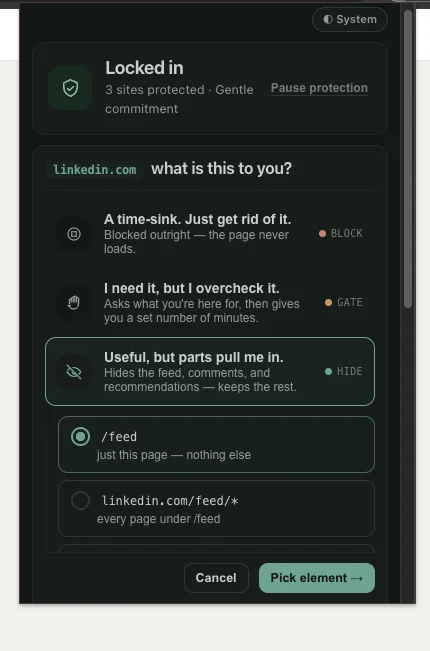
Step 1 — "Useful, but parts pull me in," then Pick element.
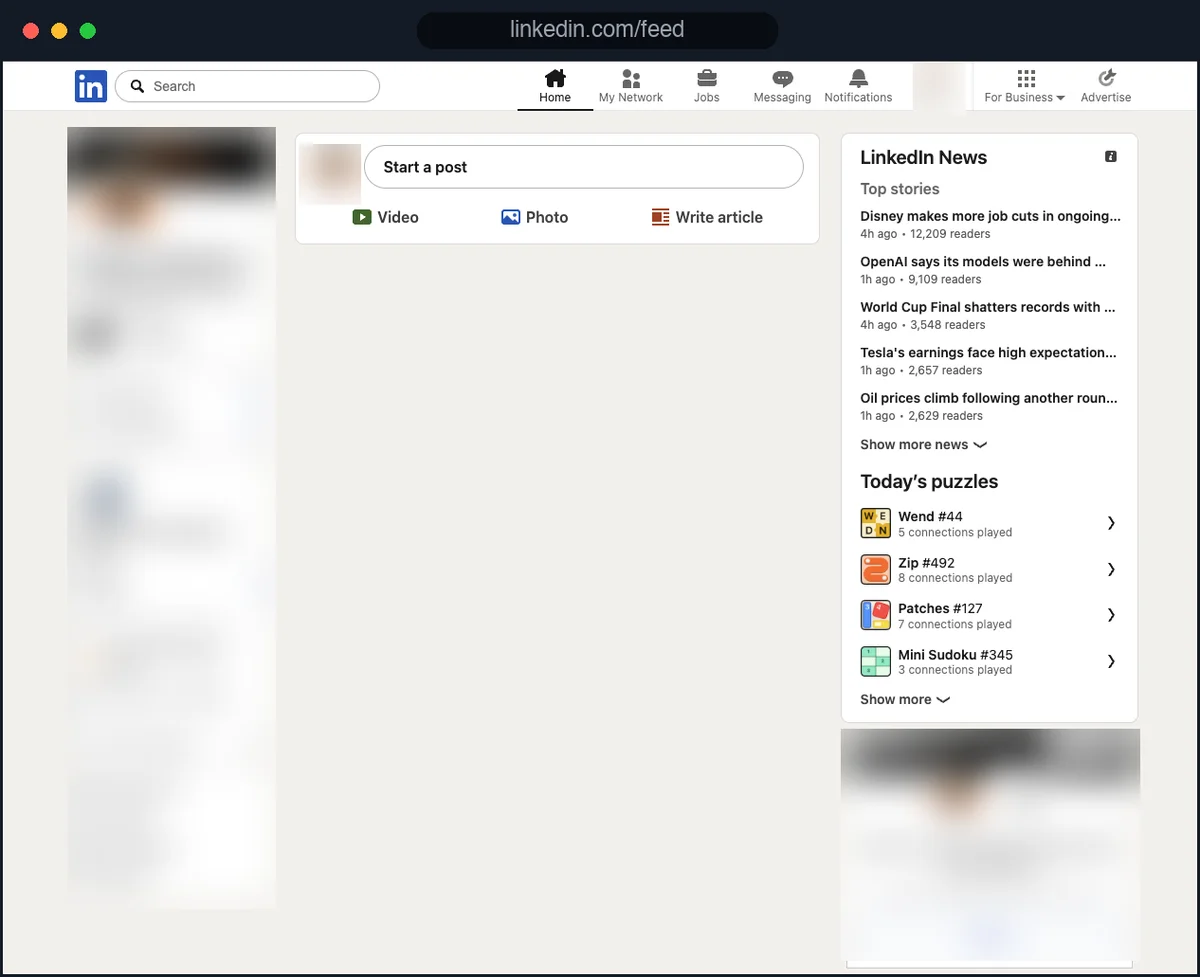
Step 2 — the feed gone; search, jobs, and messaging still working.
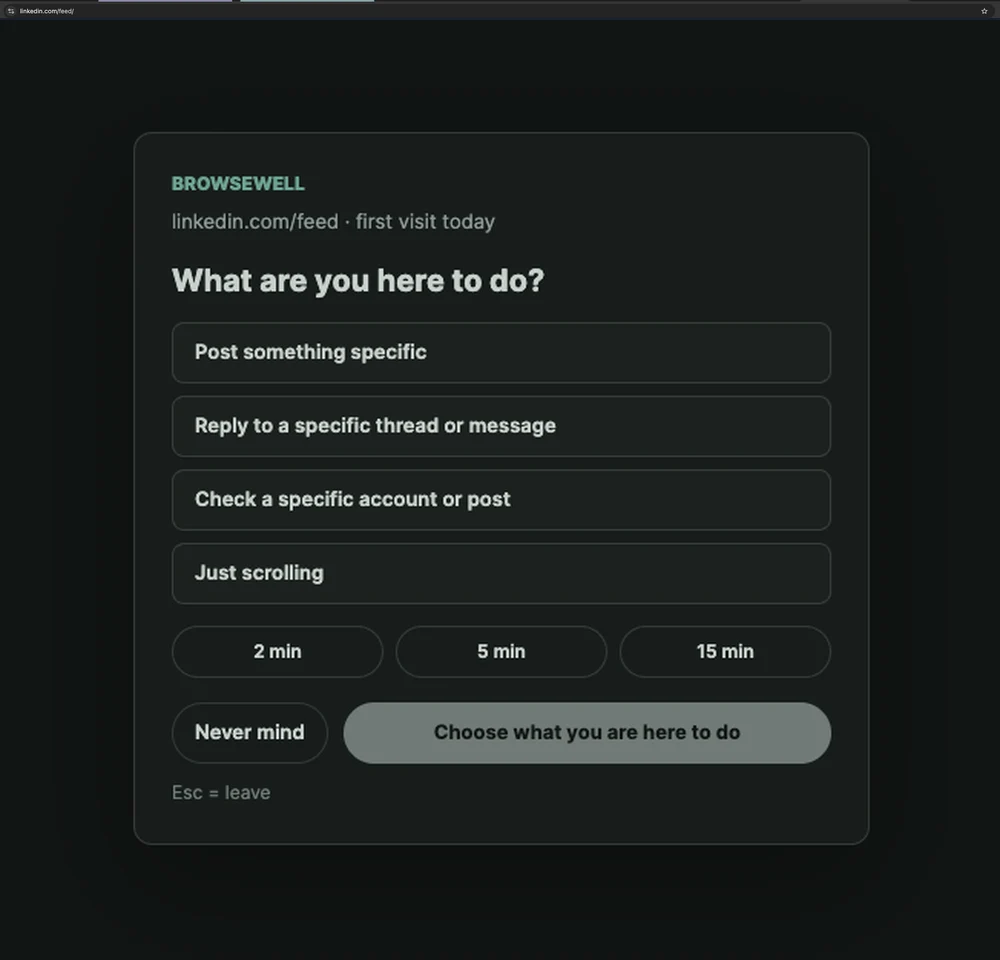
Or go one step further: gate the visit itself, so even the feed-less version starts with a stated purpose.
BrowseWell covers the hiding — feed and news rail gone while messages, notifications, jobs, and posting keep working — and then addresses the layer the hiders can't:
- Keep one element visible. For a posting session, keep just the compose box and hide everything around it.
- Intentional Sites. linkedin.com opens after you state what you're there for — "reply to Sarah's message" — for a bounded window. The task goes through; the drift doesn't get a surface to land on. The visit ends when the window does, not when something in a feed lets go of you.
- One system, every feed site. The same treatment works on YouTube recommendations (same pattern, different site), Reddit, and X — one tool instead of one hider per site.
Tested July 2026 on linkedin.com with BrowseWell v2.1.0: the main feed and the news/updates rail were hidden while messaging, notifications, jobs, and posting kept working, and linkedin.com was gated as an Intentional Site. LinkedIn re-renders as you navigate, so the rules re-apply per view.
It's local-first — browsing data stays in your browser, no account needed — with a 30-day full-access trial (no card), then $9/month, $67/year, or $197 lifetime.
Honest fit: if the feed is your only LinkedIn problem, News Feed Eradicator or a one-trick hider is free and sufficient — take that answer and go. BrowseWell is for when the feed is one instance of a wider pattern: reflex-opened tabs, multiple feed sites, visits that outlive their reason (the fuller picture). If that's you, start the 30-day free trial.
Which option fits you
| Your situation | Best pick |
|---|---|
| Feed gone today, zero config, free | News Feed Eradicator |
| Minimal extension, LinkedIn only | A single-purpose feed hider |
| Already run uBlock, comfortable with filters | The three lines above |
| Feed + news rail + the reflex-open, across sites | BrowseWell |
| Just want fewer bad posts, feed can stay | LinkedIn's native unfollow/mute |
FAQ
Can I turn off the LinkedIn feed in LinkedIn's settings? No. As of July 2026, LinkedIn's documented controls — unfollow, mute, per-post hiding, feed sorting, and feed preferences — filter the feed's contents. None of them hides or disables the feed itself.
Can I still post and message with the feed hidden? Yes — that's the point. Every approach above removes or gates the feed while leaving posting, messaging, notifications, and job search working. Hiding the feed doesn't reduce your LinkedIn presence; it reduces LinkedIn's presence in your day.