News Feed Eradicator Alternatives: When Hiding the Feed Isn't Enough
News Feed Eradicator is free and good at one thing. Here's what it covers, where feed-hiding stops helping, and what to add on top.
First, the honest version: News Feed Eradicator is free, it does exactly what its name says, and if hiding feeds is your whole problem, you may not need an alternative at all.
This page is for the people who installed it, liked it, and then noticed they were still drifting — into search results, recommendations, Shorts, or just the reflex of opening the tab in the first place. Feed-hiding solves one attention trap. It's worth being precise about which one.
What News Feed Eradicator actually covers
As of July 2026, News Feed Eradicator is a free browser extension (about 200,000 users on the Chrome Web Store) that removes the feed from social sites and replaces it with an inspirational quote. Supported sites include Facebook, Twitter/X, LinkedIn, YouTube, Instagram, Reddit, Hacker News, GitHub, and TikTok.
Everything else on those sites keeps working. You can post, search, message, check notifications, and open direct links. Only the infinite scroll in the middle disappears.
That design is genuinely good. The feed is the part of these sites most heavily engineered to keep you scrolling, and deleting it removes the main reason a 30-second visit becomes a 30-minute one. Its Chrome Web Store listing declares no data collection, it costs nothing, and it has stayed focused on its one job for years. If you don't have it installed, install it — this recommendation stands whether or not you ever touch anything else on this page.
Where feed-hiding stops helping
After a few weeks with the feed gone, most people who still struggle notice the drift has moved, not stopped:
- You still open the site. The quote page loads, you feel the small "nothing here" disappointment, and you type a search or click Notifications instead. The reflex-check habit — open tab, type "red", Enter — survives, because nothing ever interrupts it.
- The traps outside the feed still work on you. YouTube's sidebar recommendations, Shorts surfaces, and end-screen suggestions aren't "the feed." Reddit's search results and comment threads aren't either. On X, one profile click puts you back in scrollable territory.
- There's no time boundary. A legitimate visit — replying to one message on LinkedIn — has no end built into it. Twenty minutes later you're three profiles deep, and no part of the tool noticed.
- Turning it off takes a click or two. Feed back, no questions asked, nothing logged. On a low-energy day, that's not much protection.
None of this is a flaw in News Feed Eradicator. It hides feeds; these problems live outside feeds. The question is what to layer on top.
Option 1: uBlock Origin (free) for the traps NFE doesn't cover
If your remaining problem is specific page elements — Shorts shelves, sidebar recommendations, trending boxes — uBlock Origin's element picker can hide almost anything on any site, permanently and for free. We keep a worked example with exact filter lines in how to hide YouTube Shorts, and the general technique in how to block part of a website.
The combination of News Feed Eradicator plus a handful of uBlock filters is a strong free setup for cleanup. What it still lacks is everything in the next section.
Option 2: BrowseWell, when the problem is the visit, not just the page
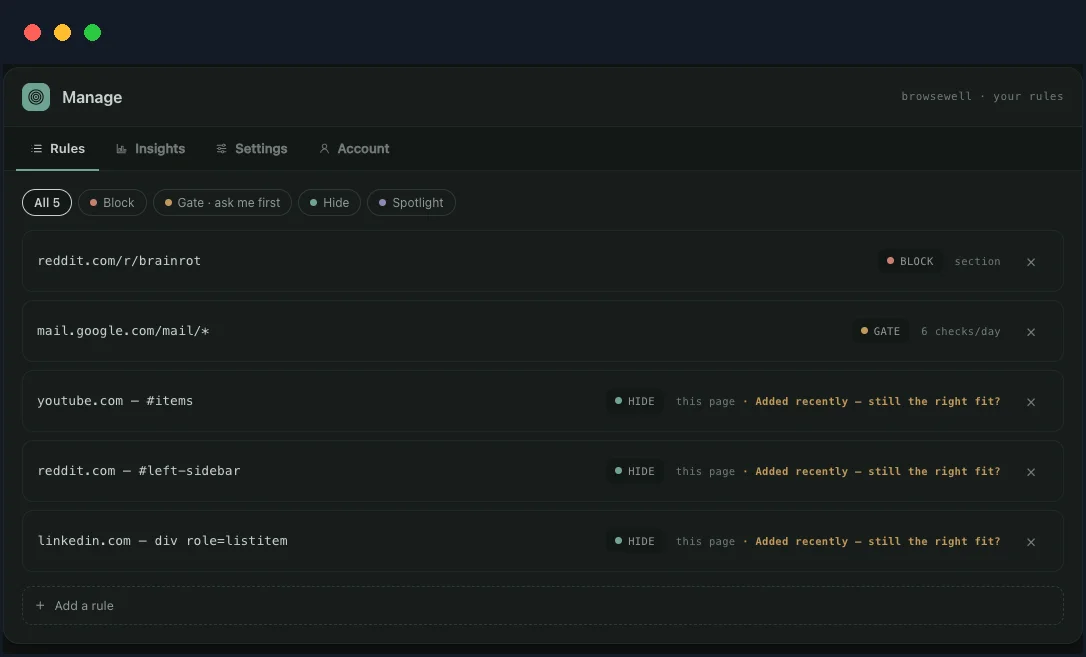
One rule list, three grains: block a path, gate a habit with a daily budget, hide the elements that pull you in.
BrowseWell is a Chrome extension that includes element hiding like NFE — it can hide feeds, recommendations, Shorts, and comments, or keep one chosen element visible and hide the rest — but its point is the layer feed-hiders don't have:
- Intent gates. Habitual sites open only after you state what you're there to do. This is the piece that interrupts the open-tab reflex itself, which no amount of hiding can reach.
- Bounded windows. Access expires. The LinkedIn reply gets three minutes, and the page tells you when they're up.
- Focus sessions. Protected blocks tied to a stated goal, not just a cleaner page.
- Deliberate bypasses. Optional Hard Mode adds a wait and a typed reflection before a rule can be turned off — so "one click and the feed is back" stops being one click.
- Path-level guards. Guard
reddit.com/r/popularor a Shorts URL pattern specifically, instead of styling elements away.
Like NFE, it's local-first: browsing data stays in your browser, and no account is needed. It's paid where NFE is free — 30-day full-access trial (no card, no account), then $9/month, $67/year, or $197 lifetime — and after the trial, basic blocking you've set up stays in place either way.
The fair framing: News Feed Eradicator changes what a page looks like. BrowseWell changes what a visit is — it asks for a purpose on the way in, keeps the stay bounded, and makes switching it off a decision instead of a twitch.
Which do you actually need?
| Your situation | Reasonable choice |
|---|---|
| The feed is the whole problem | News Feed Eradicator, done |
| Feeds plus specific elements (Shorts, sidebars, trending) | NFE + uBlock Origin filters |
| You keep opening sites on autopilot, hidden feed or not | BrowseWell's intent gates |
| Legitimate visits keep overrunning | BrowseWell's bounded windows and sessions |
| You disable your blockers on hard days | BrowseWell's Hard Mode friction |
Start with the free tools; they're good. If after two weeks the tab-opening reflex and the overrun visits are still there, that's the specific gap BrowseWell was built for — the 30-day trial is long enough to find out with one guarded site.