How to Block Reddit but Keep Specific Subreddits
Reddit has no subreddit whitelist — and it removed r/all in April 2026. Exact uBlock Origin filters to block Reddit except your chosen subreddits.
Reddit itself can't do this: its native controls only mute individual communities from your feeds, and it removed r/all entirely in April 2026 — so a subreddit whitelist has to come from a browser tool. The two working approaches are uBlock Origin strict blocking with exception filters (block reddit.com, then allowlist each subreddit you keep) or a path-aware tool like BrowseWell that guards reddit.com and its feed surfaces while leaving your chosen /r/ paths open.
If you found an older guide first, start with the next section — the ground shifted this year, and most existing advice hasn't caught up.
What changed on Reddit in 2026 (why old guides are stale)
Reddit removed r/all. Entry points and links came down starting April 2, 2026, and as of a live check in July 2026, reddit.com/r/all returns a redirect straight to the Home feed. r/popular still exists, and trending content lives on there.
Two consequences for anyone trying to keep Reddit useful but bounded:
- The classic "just block r/all" advice is obsolete on new Reddit. There's no r/all to block; following an r/all link now lands you on Home.
- The Home feed itself is now the main trap surface. The redirect means more paths funnel into the personalized feed — the exact surface a whitelist approach needs to make unreachable-by-reflex.
One carve-out: old.reddit.com still serves the classic interface, and old.reddit.com still has r/all for those who want it (both verified live, July 2026). Treat old Reddit as a legacy surface that's hanging on for now, not a guarantee.
Reddit's native options, and where they stop
Mute a community. Muting removes a community's posts from your Home and Popular feeds and its notifications, and it's reversible in settings. It's the right tool for "this one subreddit keeps surfacing and I don't want it." As a whitelist strategy it inverts the problem: you'd be muting the endless set of communities you don't want, one at a time, while the feed surface itself — the thing that pulls you in — stays fully operational.
Read via old.reddit.com. A subreddit's old.reddit URL (old.reddit.com/r/webdev) is a noticeably lower-stimulation way to read it — the classic interface predates most of the modern feed machinery. Bookmarking your two or three work subreddits on old Reddit is a real, free tactic. Its limits: it relies on a legacy surface Reddit could retire, and it's a habit change rather than an enforcement mechanism — nothing stops the reflexive reddit.com type-and-enter.
There is no native subreddit whitelist. Reddit's controls filter what appears in feeds; none of them can make "reddit.com minus my three subreddits" unreachable.
The uBlock Origin whitelist recipe
uBlock Origin can express "block Reddit, except these" directly. Two filter types combine: a strict block on the domain, and one exception line per subreddit you keep. In the uBlock dashboard → My filters, add:
||reddit.com^$document
@@||reddit.com/r/webdev^$document
@@||reddit.com/r/experienceddevs^$document
The first line blocks every reddit.com page with uBlock's block page. Each @@ line is an exception that lets one subreddit through — add one per community you're keeping. If you read on old Reddit and want its r/all gone too:
||old.reddit.com/r/all^$document
Honest limits, stated plainly:
- It's genuinely all-or-nothing outside your exceptions. Search, user profiles, that link a colleague sends you — all hit the block page unless you add exceptions for them too.
- The block page is a wall, not a gate. There's no "let me in for 5 minutes for a reason" — you either edit your filters or turn uBlock off, and turning it off un-guards everything.
- No time-bounding. Inside your kept subreddits, nothing distinguishes a two-minute answer-check from a two-hour stay.
Best for: people who want a hard, free, set-and-forget wall and rarely need Reddit outside their listed communities.
The middle path: hide the feeds, keep the site
If full blocking is too blunt — you sometimes search Reddit, follow links from elsewhere, or browse profiles — a maintained filter list takes the opposite approach: leave all of reddit.com reachable but hide the feed containers on the surfaces that pull you in. Verbatim from "Filters for Social Media Distractions" (v1.2.2, February 2026):
www.reddit.com##shreddit-app[pagetype="home"] .main-container
www.reddit.com##shreddit-app[pagetype="popular"] #subgrid-container
Direct subreddit URLs keep working; the Home and Popular feeds render empty. Combined with bookmarks for your kept communities, this covers a lot of ground for free. The limit is the mirror image of the recipe above: nothing is actually blocked, so reddit.com/r/anything remains one address-bar keystroke away — and cosmetic selectors rot when Reddit changes its markup.
BrowseWell: guard the paths, gate the visits
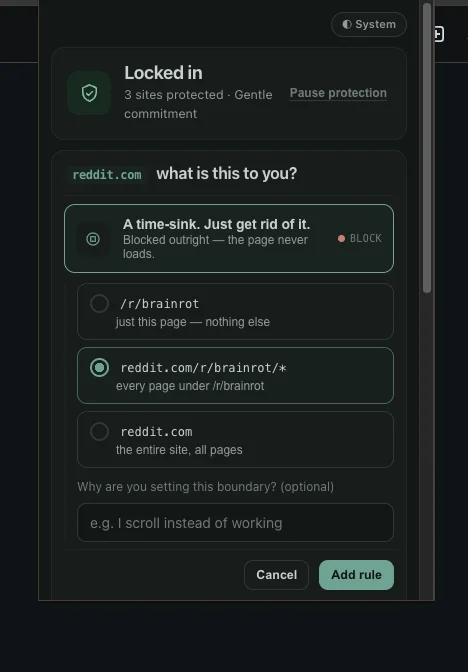
Step 1 — open the popup on Reddit, choose Block, and scope it to the one path that eats you.
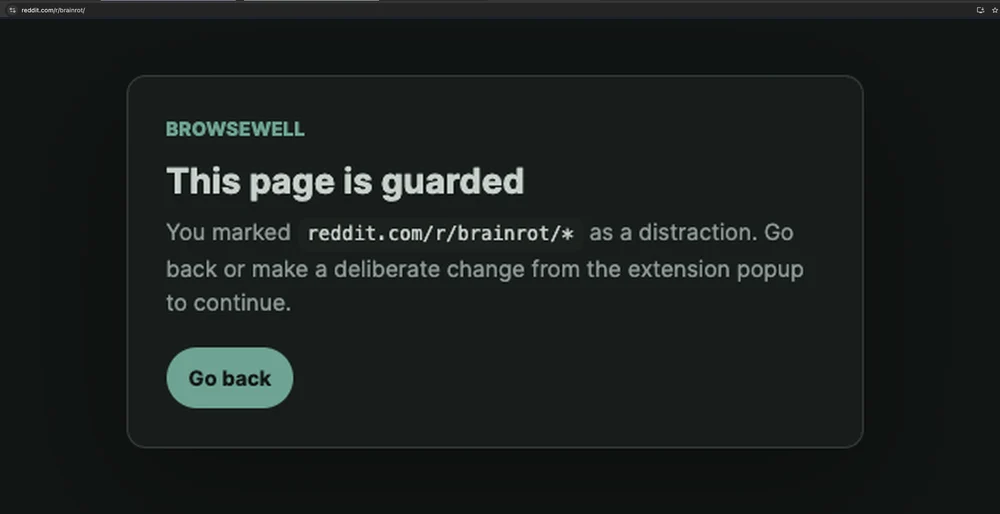
Step 2 — done. That path is covered; every subreddit you actually use loads normally.
This exact use case — keep reddit.com/r/webdev, lose the feeds — is the demo BrowseWell was built around. It thinks in paths and visits rather than filters:
- Guard reddit.com at the domain level while your chosen /r/ paths stay open — the same shape as the uBlock recipe, without maintaining filter syntax, and with a real page explaining the guard instead of a bare block. (The general pattern: how to block part of a website.)
- Or gate instead of wall: make reddit.com an Intentional Site, so it opens after you state what you're there for — "find the memory-leak thread" — for a bounded window. Even your kept subreddits get entered on purpose, and the visit has an end built in. That's the piece no filter can provide: uBlock edits pages; a gate shapes the visit (why that distinction matters for reflex-checking).
- Hard Mode for your 11pm self: turning a guard off takes a delay and a typed reflection, so the workaround is a decision, not a twitch.
Tested July 2026 on reddit.com with BrowseWell v2.1.0: a path guard on reddit.com/r/brainrot showed the guard page while reddit.com/r/webdev and other subreddits loaded normally (screenshots above); the r/all → Home redirect was verified live. Reddit renders as a single-page app, so guards re-apply across in-app navigation.
BrowseWell is local-first — browsing data stays in your browser, no account — with a 30-day full-access trial (no card), then $9/month, $67/year, or $197 lifetime. If a blunt blocker keeps failing you precisely because Reddit is part of your actual work, that's the gap this fills — start the 30-day free trial. For the walls-vs-gates comparison against a hard blocker, see BrowseWell vs Cold Turkey.
Which approach fits you
- "I want Reddit gone except two communities, free, and I don't mind a hard wall" → the uBlock whitelist recipe.
- "I need Reddit search and links to keep working; the feeds are the problem" → the feed-hiding filter lines.
- "I read my subreddits calmly on old Reddit anyway" → old.reddit bookmarks, plus either filter approach on www.reddit.com.
- "The feeds pull me in and I open Reddit on reflex" → BrowseWell: guard the feed surfaces, keep your work paths, gate the domain behind intent.
- "One annoying community keeps appearing, that's all" → Reddit's native mute. Not everything needs a system.
Whichever you pick, do it this week rather than perfectly: the difference that matters is between "Reddit's feed is one reflex away" and "my three useful communities are one bookmark away" — every approach above achieves the second state.